


Dynamics 365 Human Resources – HR management that helps people and the business grow
Dynamics 365 Human Resources brings employee data, recruitment, compensation and performance into one cloud system.
Employees check their leave balance and submit leave requests right in Microsoft Teams, and HR sees key workforce metrics in one view. OIXIO Digital implements the system and connects it to your finance, payroll and recruitment systems.

How Dynamics 365 Human Resources helps you
Dynamics 365 Human Resources is Microsoft’s cloud HR system that supports the entire employee journey, from hiring and onboarding to performance reviews and the end of employment. HR manages employee data, compensation and development plans in one place, without reconciling spreadsheets and email threads by hand.
Managers clear routine HR tasks faster because the system automates business processes and approval workflows. Team performance and feedback sit in one view, so there is no separate data gathering before a development review.
How many systems does your HR manager have to open today to tell you how many vacation days the team has left at year end?
The entire employee journey in one system
- Design management structures, departments and positions
- Manage and store employee data in one place
- Run recruitment projects and candidate selection
- Handle onboarding, transfer and offboarding tasks with checklists
- Create compensation plans and flexible benefits packages
- Manage absences and leave
- Set goals and evaluate employee performance
- Build HR programs that comply with changing regulations
- Track key HR metrics from a single view
What changes in HR work
Employee development becomes visible
A rich employee profile brings career achievements, skills, certifications and interests into one view. The system tracks training and certifications, and skill gap analysis shows where the team falls short of target levels.
Compensation follows the rules
Compensation plans can be built from defined guidelines and rolled out across the company at once. Employees choose their benefits in self-service, taking their own life events into account. Programs comply with changing regulations, which matters for any company operating in more than one country.
Systems talk to each other
Dynamics 365 Human Resources connects with other Microsoft 365 applications, with payroll, talent management and recruitment systems, and with LinkedIn Talent Solutions. The payroll integration also brings payroll budgets and tax filings into one view. Employees check leave balances and submit leave requests directly in Microsoft Teams.
Decisions rest on data
Embedded analytics show how HR programs perform. Power BI dashboards bring together headcount by department, average tenure and employee status distribution for workforce planning. Employee sentiment can be measured with surveys.
Modules and workspaces
- Organization structure – describe and set up departments, jobs and positions
- Recruitment – manage recruitment projects, with an overview of applicants and applications
- Skills management – analyze skills and track employee development
- Employee data – personal and contract data, plus records of equipment issued to employees
- Benefits and compensation – describe and set up compensation plans and benefits
- Performance management – set goals and track progress
- Employee self-service – training, goals and leave requests in the employee’s own view
- HR management workspace – HR metrics in one view
- Task management – checklists for onboarding, internal transfers and offboarding
Copilot and agents in Dynamics 365 Human Resources
In HR, the value of Copilot and agents is simple: less time on administration, more time for people. Copilot drafts documents and summaries, finds information in existing data and supports everyday processes with automatic reminders and agents.
Leave balances in self-service
On the My information tab, employees see a Copilot summary of their leave balances and how much leave may expire under carry-over rules. Employees plan time off in good time, and the company builds up less unused-leave liability.
Documents and queries
Microsoft 365 Copilot drafts job descriptions, job postings, interview questions and onboarding plans based on the skill requirements in the system, and summarizes performance reviews and feedback. You can query data in natural language, for example “show the departments with the most certifications expiring in the next 60 days”.
Agents work in the background
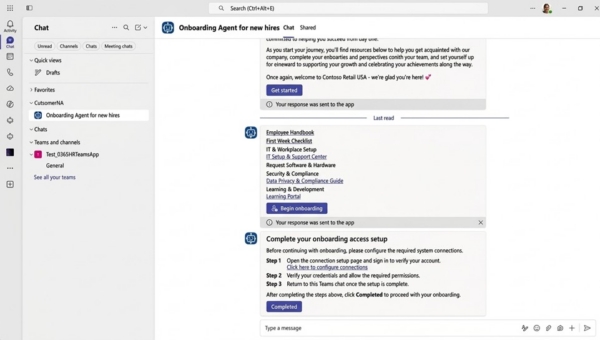
In Copilot Studio, you can build an agent that uses Human Resources data through the Dynamics 365 ERP MCP server. The agent can, for example, track onboarding deadlines and remind people of open steps. That cuts routine manual work and speeds up HR response times.
Example: an onboarding agent in Teams. A new employee gets help in Microsoft Teams from an onboarding agent that guides them through the required tasks and helps them find information. At the same time, HR sees how onboarding is progressing. HR staff stay in charge of the process, while the agent handles repetitive questions and reminders.
Copilot functionality keeps expanding, and what you can use depends on your organization’s licenses.
Who should use Dynamics 365 Human Resources
Dynamics 365 Human Resources suits growing companies that want to bring recruitment, compensation and performance reviews into one system and connect HR data with finance and supply chain data. If you already use Dynamics 365 Finance or Supply Chain Management, Human Resources runs on the same platform and shares employee and organization data with them.
Every project starts with a discovery phase, where we map your current HR processes and integration needs and set the timeline. For Microsoft’s official product information, see the Dynamics 365 Human Resources product page.
Local payroll and HR for the Baltics
Microsoft provides a strong international HR system. Payroll rules and labor law, however, differ from country to country.
OIXIO Baltic Payroll and HR adds local HR and payroll processes to the Dynamics 365 HR module, without a separate system. Everything runs in the same Dynamics 365 environment: data entered in HR goes straight into payroll, with no duplicate entry. It adds:
✓ Payroll for Estonia, Latvia and Lithuania
✓ Working time and absence management
✓ Employee self-service
✓ Local integrations
Together, Dynamics 365 HR and OIXIO Baltic Payroll and HR form one complete HR and payroll system. Read more about OIXIO Baltic Payroll and HR.

Frequently asked questions
Dynamics 365 Human Resources is Microsoft’s cloud-based HR management system that supports the entire employee journey, from designing the organization structure and recruitment to compensation, performance reviews and the end of employment.
Growing companies that want to standardize HR processes, bring them into one system and connect HR management more closely with their other business processes.
Human Resources is part of the Dynamics 365 platform. It connects with Finance and Supply Chain Management, Microsoft 365 and third-party payroll and talent management systems, so HR data does not sit apart from the rest of your business data.
Yes. Human Resources runs on the same platform and shares employee and organization data with other Dynamics 365 applications. You can manage people, finances and the supply chain from one system
Human Resources is not a payroll system itself, but it integrates with third-party payroll solutions, so employee and compensation data moves between systems automatically. Payroll budgets and tax filings can also be managed through the integration. OIXIO has Baltic Payroll solution for that.
In the self-service portal and in Microsoft Teams, employees check their leave balance, submit leave requests, track training and certifications, and follow progress on their goals.
You can manage recruitment projects and track applicants and their applications. Integration with LinkedIn Talent Solutions and talent management systems brings recruitment information into one view.
Yes. Power BI analyzes HR data, Power Automate automates repetitive processes, Power Apps lets you build custom applications, and Microsoft Copilot Studio lets you create agents that answer employees’ and managers’ questions.
Contact Us

OIXIO Group